Feuillet
Markdown editor for Windows 11 that thinks in pages: live A4 preview and clean PDF export (Tauri 2, Rust)
Made by AI (Claude)Code generated by Claude (Anthropic), under my direction and reviewed by me. Learn more
GitHub repository README · View on GitHub

Feuillet
The Markdown editor for Windows 11 that thinks in pages.
Write in Markdown, see your A4 pages live, export a clean PDF.



Overview
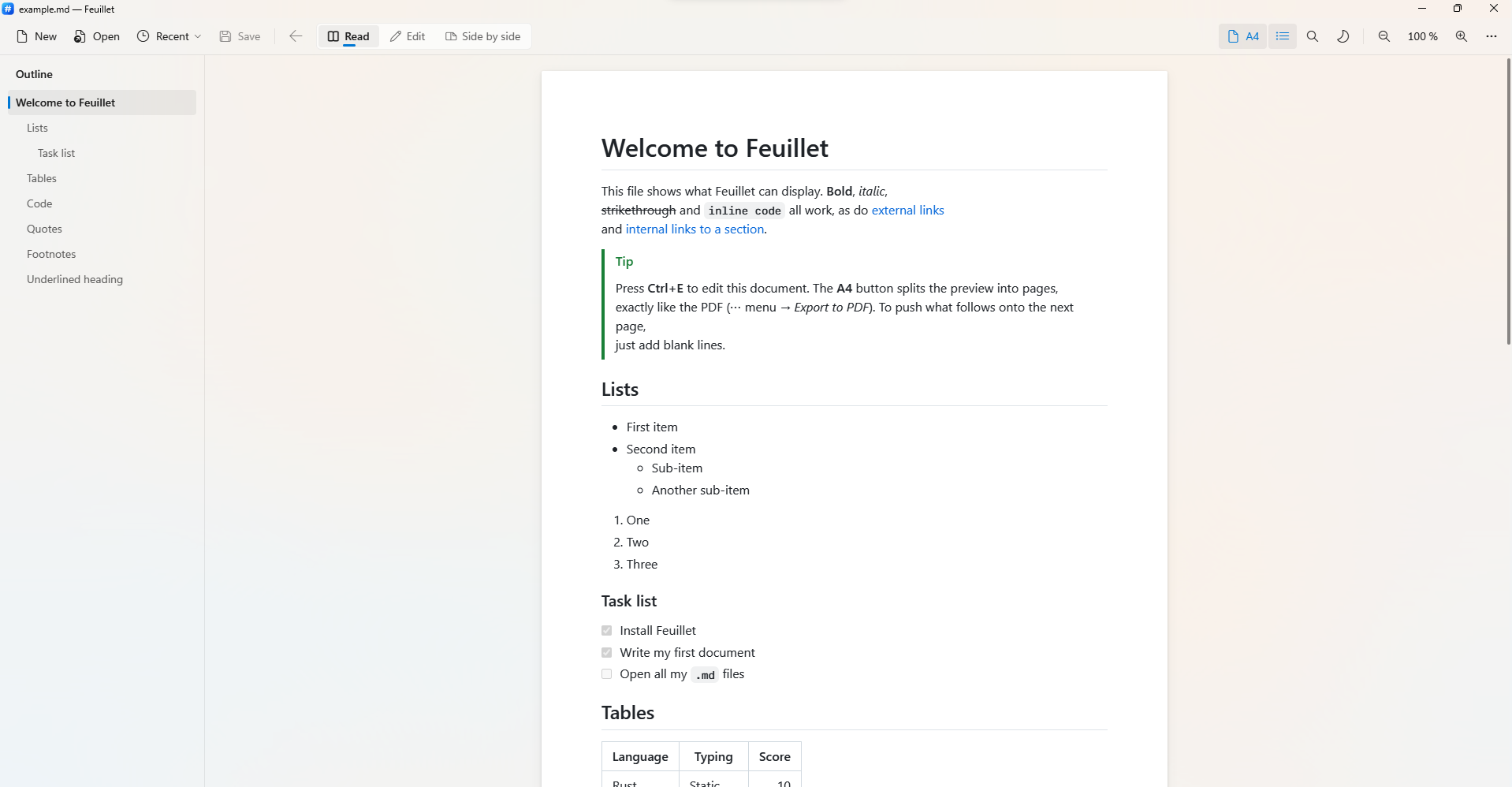
Feuillet (French for leaf of paper) is a Markdown (.md) editor and viewer for Windows 11. It renders documents exactly like GitHub, and splits the preview into A4 pages: what you see on screen is what you get in the PDF.
It is light (a single executable of a few MB), fast, needs no account or internet connection, and your files stay plain text files that open anywhere.
The interface is available in English and French. Feuillet follows the Windows display language by default; you can change it from the ⋯ menu → Language.
Features
Read
- GitHub-identical rendering: headings, tables, task lists,
[!NOTE]alerts, footnotes, images, syntax highlighting with a “copy” button - Clickable outline that follows your reading position
- Find in document (ignores case and accents)
- Links to other
.mdfiles open in Feuillet, web links open in your browser - Automatic reload when the file is changed by another program
Write
- Three modes: Read, Edit, Side by side (live preview)
- Editor with Markdown highlighting, undo / redo, find / replace
- Formatting toolbar: bold, headings, lists, tasks, links, images, code, tables…
- Line breaks are kept: pressing Enter in the file starts a new line in the preview (can be turned off in the ⋯ menu for standard Markdown, where a single line break is just a space)
- Warning before losing unsaved changes
Lay out
- A4 mode: the preview is split into pages, and the editor shows where each page starts
- Blank lines count: to push content onto the next page, just add blank lines to the file. A blank line at the bottom of a page disappears, so a page never starts with empty space.
- Explicit page breaks are recognized:
<!-- pagebreak -->,\newpage,\pagebreak(and the French<!-- saut de page -->) - PDF export in A4 format (20 mm margins, always in light theme) and printing
Windows 11
- Fluent interface: Mica background, Segoe Fluent icons, system accent color
- Light / dark theme, zoom, recent files, drag and drop
- English and French interface, following the Windows language
.mdfile association (double-click in File Explorer)- Right-click → New → Markdown document in File Explorer, with the Feuillet icon; the empty file opens straight in editing mode
Reliability
- Encodings detected and preserved: UTF-8 (with or without BOM), UTF-16, Windows-1252; Windows line endings preserved
- Safe saving: a file is never left half-written
- Security: HTML in documents is sanitized (no scripts), links cannot launch programs, binary files and files over 20 MB are refused
Installation
- Download
Feuillet-v1.0-setup.exefrom the Releases page. - Run it. No administrator rights are needed. The installer is in English or French, depending on your Windows language.
- Check “Open .md and .markdown files with Feuillet” to open them with a double-click, and “Add Markdown document to the File Explorer New menu” to create one with a right-click (both are on by default).
Requirements: Windows 11 (or Windows 10 with the WebView2 Runtime, already present on most machines), 64-bit processor.
Windows SmartScreen may show a warning on first launch, because the installer is not
digitally signed yet. Click “More info”, then “Run anyway”.
See the code signing policy.
The installer automatically replaces the previous version, called “Visionneuse Markdown”, if it is installed.
Usage
Open a .md file (double-click, drag and drop, or Ctrl+O), then press Ctrl+E to edit it.
Preparing a clean PDF
- Turn on A4 mode (button at the top right, on by default).
- Switch to Side by side mode (
Ctrl+E): the preview shows the pages, and the editor shows “Page n” markers. - If a heading or a table falls badly, add a few blank lines before it until it moves to the next page.
- ⋯ menu → Export to PDF (
Ctrl+Shift+P).
Changing the language: ⋯ menu → Language → Automatic (Windows), Français or English. The change is immediate, no restart needed.
Keyboard shortcuts
| Key | Action |
|---|---|
Ctrl+O / Ctrl+N | Open / new document |
Ctrl+S / Ctrl+Shift+S | Save / save as |
Ctrl+E | Side-by-side editing / back to reading |
Ctrl+B / Ctrl+I / Ctrl+K | Bold / italic / link (in the editor) |
Ctrl+F | Find (in the editor: find / replace) |
Ctrl+Shift+P / Ctrl+P | Export to PDF / print |
Ctrl+T | Show / hide the outline |
Ctrl+D | Light / dark theme |
Ctrl + / Ctrl - / Ctrl 0 | Zoom (or Ctrl + mouse wheel) |
F5 | Reload the file |
Alt+← | Previous document |
Building from source
Prerequisites
- Rust (stable)
- Node.js 20 or later
- WebView2 (already present on Windows 11)
- For the installer: Inno Setup 6
Build
npm install
npx tauri build --no-bundle
The executable is created at src-tauri\target\release\feuillet.exe.
With the GNU Rust toolchain (MinGW),WebView2Loader.dllmust sit next to the executable;
the build creates it in the same folder.
Development (hot reload of the interface):
npx tauri devInstaller:
& "$env:LOCALAPPDATA\Programs\Inno Setup 6\ISCC.exe" installer\setup.issIt is created at release\Feuillet-v1.0-setup.exe.
Tests:
cd src-tauri
cargo test
cargo run --example render < ..\example.md   # prints the generated HTML
Architecture
├── index.html            Window structure
├── src/                  Interface (JavaScript, Vite)
│   ├── main.js           Application: files, modes, preview, PDF
│   ├── i18n.js           Translations (English, French)
│   ├── editor.js         Editor (CodeMirror 6) and page markers
│   ├── format.js         Formatting commands
│   ├── pages.js          A4 pagination
│   ├── find.js           Find in preview
│   └── style.css         Windows 11 (Fluent) style
├── src-tauri/            Core (Rust, Tauri 2)
│   └── src/
│       ├── main.rs       Commands: read, save, render, export to PDF
│       ├── markdown.rs   Markdown → HTML (comrak), then sanitizing (ammonia)
│       └── text.rs       Encodings and safe saving
└── installer/setup.iss   Installer (Inno Setup, English and French)
Rust reads and writes files, turns Markdown into HTML and sanitizes it. The interface (WebView2) displays the result, runs the editor and lays out the pages. The PDF is produced by WebView2's print engine, which guarantees it matches the preview exactly.
Adding a language
- In
src/i18n.js, copy theenblock, translate it, and add it toDICTSandLANGUAGES. - Add a menu entry in
index.html(next to Français and English), and accept the new code inreadSettings()insrc/main.js. - Translate the error messages in Rust (
tr!macro insrc-tauri/src/main.rs). - Add the language to
installer/setup.iss([Languages]and[CustomMessages]).
Automated builds
Every release is built by GitHub Actions on GitHub's servers, directly from the source code in this repository: tests, application, then installer. Builds of the main branch can be downloaded from the Actions tab (“Artifacts”).
To publish a version: update the version in src-tauri/tauri.conf.json, src-tauri/Cargo.toml and package.json, then push a tag (git tag v1.1, git push origin v1.1). The installer is attached to a draft release, to review and publish.
Code signing policy
Free code signing provided by SignPath.io, certificate by SignPath Foundation.
The application to SignPath Foundation is in progress: current releases are not signed yet.
Only installers built by the automated build from this repository are signed, and each signing request is approved manually.
Team roles
Changes from other contributors (pull requests) are reviewed by a committer before being merged.
Privacy: this program will not transfer any information to other networked systems unless specifically requested by the user or the person installing or operating it. (Web links in a document open in your browser only when you click them.)
Contributing
Contributions are welcome: bug reports, ideas, translations, code. See CONTRIBUTING.md.
License
Feuillet is free software, distributed under the GNU General Public License, version 3 or later (GPL-3.0-or-later).
You may use, study, modify and redistribute it freely. Any modified version you distribute must remain under the same license, with its source code. This program comes with absolutely no warranty.
Third-party components
Feuillet relies on free libraries, all compatible with the GPL v3:
| Component | Role | License |
|---|---|---|
| Tauri | Window and application | MIT / Apache-2.0 |
| comrak | Markdown rendering (GitHub flavor) | BSD-2-Clause |
| ammonia | HTML sanitizing | MIT / Apache-2.0 |
| CodeMirror | Editor | MIT |
| highlight.js | Syntax highlighting | BSD-3-Clause |
| github-markdown-css | GitHub style | MIT |
| webview2-com / windows-rs | PDF export | MIT / Apache-2.0 |